AI World Models: What They Are and How They Work
An AI world model is a machine learning model that learns how an environment changes, so that given the current state of that environment and an action taken in it, the model predicts the environment's next state. Unlike LLMs, a world model is not optimized to continue a plausible sequence. It is optimized to predict what an environment does in response to an action.
The AI world models getting the most attention today, including NVIDIA Cosmos, Google DeepMind's Genie, Meta's V-JEPA, and World Labs' Marble, are trained on video and 3D data. They analyze the physical world through video, depth, and sensor data. The same idea is now being applied to software environments, an approach called digital world models, or DWMs.
This article explains the difference between AI world models and LLMs. It also explores how AI world models work, the difference between physical and digital world models, and a hands-on example on how they can be used.
Summary of key AI world model concepts
What is an AI world model?
An AI world model is a machine learning model that learns how an environment behaves, and specifically how it changes. Given the environment's current state and an action, it predicts the state that follows. Once you have a model like that, you no longer need the environment itself to experiment in. You can ask what would happen if a particular action were taken, and read the answer out of the model.
The state-action-next-state loop
A world model has three integral components:
- State - Takes different forms depending on the environment, such as an image or video frame, audio, sensor readings, or simple text.
- Action - Whatever can be done within the environment, from making a left turn to executing a tool call.
- Next state.
The current state of an environment plus the candidate action are used to predict how the environment responds (next state). The predicted next state becomes the current state of the step after it.
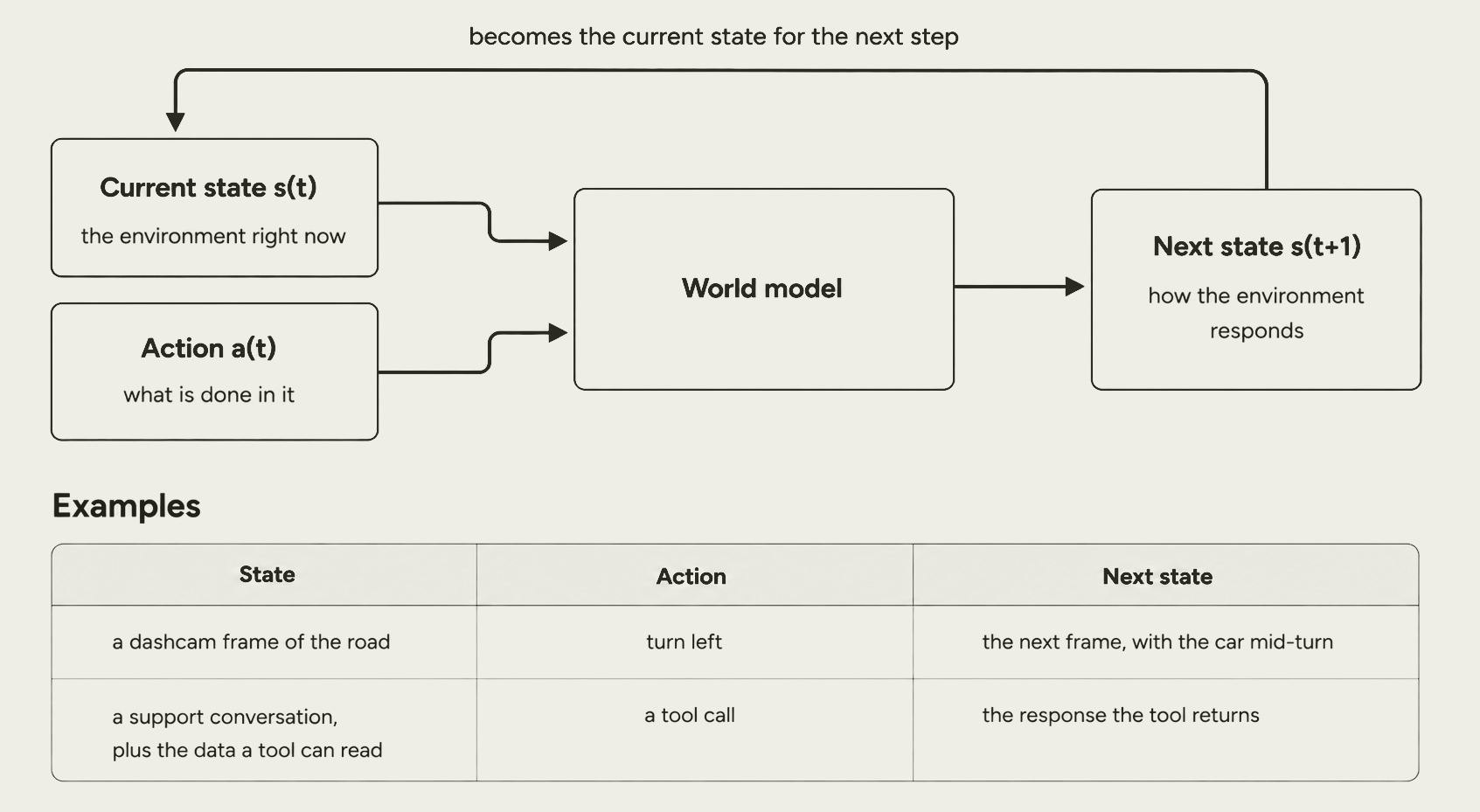
The above figure shows the loop running over two example environments that have almost nothing in common. In the first, the state is a dashcam frame of the road, the action is a left turn, and the next state is the following frame with the car mid-turn. In the second, the state is a support conversation together with the data a tool can read, the action is a tool call, and the next state is the response the tool returns.
{{banner-large-dark-3="/banners"}}
Design approaches
World models differ mainly on one design choice: how the predicted next state is represented. Each option has a different trade-off.
Generative approach
Generative, or reconstruction-based, models reconstruct the full next observation. For example, Cosmos and Genie both work this way, emitting a video frame. The output is human-viewable and works directly as synthetic data, at the cost of spending model capacity on surface detail that may not matter for the decision at hand.
Joint-embedding predictive architecture (JEPA)
A Joint-embedding predictive architecture predicts the next state as embedded vectors in a high-dimensional abstract latent state instead. Yann LeCun's 2022 position paper introduced and argued for this architecture, on the grounds that reconstructing full observations wastes capacity on unpredictable detail and that predicting in latent space generalizes better.
The downside of this approach is that the latent space is not human-readable, so it is difficult for a human to evaluate JEPA’s outputs.
A rule of thumb is to use a generative model when a person or a data pipeline needs to see the output, and a joint-embedding model when only the agent's planner consumes it. Note that a digital world model is generative in this taxonomy. A digital world model emits a text observation you can read, which is the tool's response, rather than a latent vector.
How a world model is trained
A world model is trained on recorded transitions. Each training example is a state, an action taken in that state, and the next state the environment actually produced.
For example, in a world model trained for driving, one training example is a frame from the camera, the turn the driver made at that moment, and the next frame. Similarly, in an AI agent world model, one training example can be the user conversation so far, together with the data a tool can read, the tool call the agent made, and the response that tool returned. Hundreds of hours of recorded driving, or thousands of recorded agent sessions, give you millions of data points for training.
With this setup, the training works like any other supervised setup. The model sees the state and the action, predicts the next state, and the loss measures how far that prediction is from the next state that was actually recorded. Run that over the dataset, and the model learns the environment's dynamics.
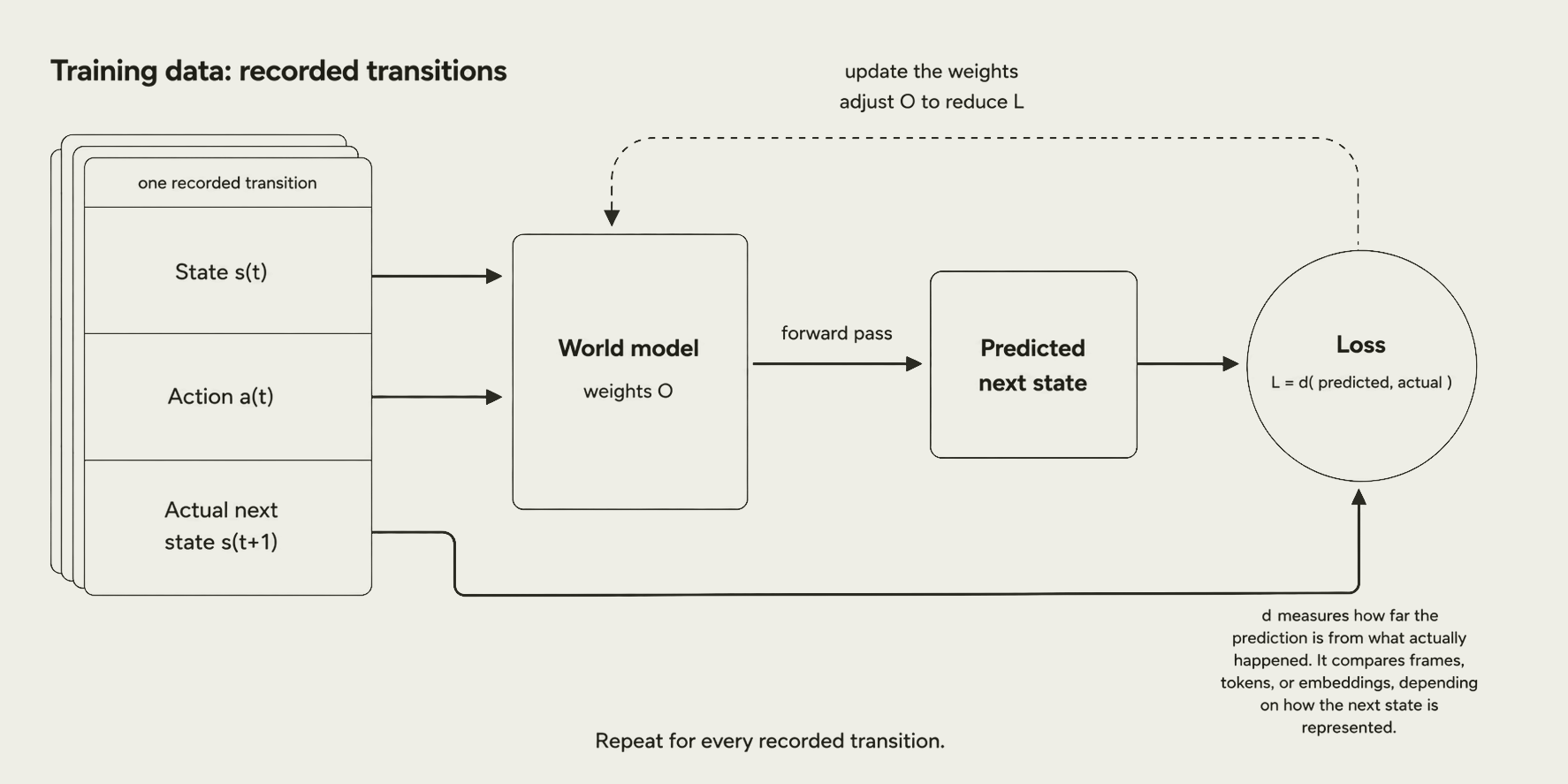
What differs between training world models is how the next state, which is used to compare loss, is represented. A generative world model predicts the human-observable next state, so the loss is comparable directly against the actual next state. A joint-embedding model (JEPA) predicts an embedding of the next state instead, so the actual state must also be converted to vector embeddings before loss calculation.
World models vs. LLMs
Training objective
Modality is not what separates the two, since both can be multimodal. What separates them is the training objective. An LLM continues a sequence it was trained to imitate, while a world model predicts an environment's response to an action, conditioned on the state, the tools, and the rules. A world model can therefore be built over a software environment because all of that can be expressed in text, which is what makes a digital world model possible.
Example
However, you might be thinking: if a world model for text just emits text tokens, how is it different from an LLM, which also predicts next tokens? Let’s consider an example of a game of Wordle to see the difference.
Wordle hides a five-letter word. For each letter of your guess, it returns green if the letter is in the right place, yellow if the letter is in the word but somewhere else, and gray if the letter is not in the word at all. Here:
- The state is the game as it stands, and it includes the hidden word, say CRANE. The player cannot see that word, but the environment can, and a world model standing in for the environment has it too.
- The action is the next guess, say RAISE.
- The next state is the row of colors the game returns: yellow, yellow, gray, gray, green. R and A are in CRANE but in the wrong positions; I and S are not in it at all, and E is the fifth letter of both words.
Now try the same thing with an LLM. Give it the hidden word CRANE, the guess RAISE, and the rules, and it will usually return the correct row.
That does not make it a world model. The LLM has read a lot of Wordle text, so it writes the row that a Wordle row normally looks like. Nobody ever trained it on what this game returns for this guess. On an easy guess, the row that looks normal is also the correct row, so you cannot tell the two apart here.
A world model gets to the same answer a different way. It was trained on real records from the game, each one a hidden word, a guess, and the colors the game returned. It answers yellow, yellow, gray, gray, green because that is what the game does, not because that is what a Wordle row usually looks like.
The gap shows on harder guesses. Suppose your guess uses the letter E twice and the hidden word has only one E. Wordle credits one E and grays the other. Nothing in the LLM's training forces it to apply that rule, and when it gets the rule wrong, the row it writes still looks like a normal Wordle row. Nothing marks it as wrong.
In one game, that does not matter. It matters when you generate a million rows to train an agent, because the wrong rows go in with the good ones.
Both answers are five tokens long. The difference is not the output format. One imitates what Wordle rows look like, and the other reproduces what Wordle does.
What is a digital world model
A digital world model (DWM) learns the dynamics of digital environments such as software repositories, terminals, customer service flows, web search, and API or tool calls, and predicts how one of them responds to an action. Instead of executing real software or calling real tools, a digital world model predicts the response.
Patronus AI offers digital world models leading on coding, dialogue, research, and general tool use across public benchmarks, including InterCode, τ-bench, BFCL-v4, and Toolathlon.
Physical vs. digital world models
The two world models mainly differ in the environments they operate in. A physical world model learns how the physical world behaves and takes it in through cameras and sensors. A digital world model learns how software behaves and takes it in as text. The following table compares them.
How a digital world model works
The input to a digital world model consists of five components, and the model works with all of them at once rather than reading them one after another:
- Initial environment state, meaning the data and configuration the agent can see
- Task context, meaning the goal and the conversation so far
- Tool schemas, meaning the available tools and their signatures
- Domain rules, or domain knowledge, meaning the constraints on which transitions are valid
- Steering directives, meaning the guardrails on behavior.
The model holds the full environment internally and returns only what the action produced. For example, when an agent looks up one booking, the model returns that booking's details, not the whole database. Patronus calls this internal state tracking, and it keeps the context from filling up with state the agent does not need to see. It is also what keeps a single prediction accurate.
Steering directives are how you control that behavior. For example, withholding information makes the task harder, and forcing a tool to fail lets you see whether the agent recovers. Patronus AI tested these adversarial cases, and human annotators found that the model follows steering directives closely, especially forced tool failures.
Why use a digital world model instead of a hand-built RL environment
The usual way to train a tool-using agent is to hand-build a reinforcement learning environment with fixed tasks, rewards, and tools. That approach runs into three compounding problems.
- Hand-built environments are hard to build reliably, and an agent that finds a shortcut through a reward function tends to take it.
- They are static, so tasks do not get harder as the agent improves.
- A fixed set of tools and rewards limits how well the agent's learned behavior transfers.
A digital world model learns the environment's dynamics instead of encoding them by hand, so it scales to new tasks without a separate engineering project for each one. See this guide to RL environments for more information about hand-built environments and where they fit.
What you can achieve with a digital world model
With a digital world model, you can:
- Generate simulation data at scale, instead of hand-building an environment for every task.
- Get cross-domain generalization, so a model trained on several customer service domains can produce believable states for a domain it never saw during training.
- Work with natural-language tools and model-generated rewards, instead of a fixed tool list and a hand-written reward function.
- Use the model as the environment itself, so an agent can run a full multi-turn interaction without executing anything.
Working with Patronus Digital World Models
Let's see a digital world model in action. The model simulates the environment for an agentic AI application, which in this case is an airline customer support agent. The agent:
- Reads a customer's booking.
- Checks which alternative flights have seats.
- Prices the change against the airline's rules.
- Answers the customer.
To do any of that, it has to call the airline's booking system. The world model takes the place of that booking system and predicts what it would have returned.
We will run one use case, a flight change. A passenger with booking `LON7K4`, flying London to New York, wants to move the flight to 15 October, and the agent is about to call a `get_change_flight_options` tool. Our job is not to answer the customer. It is to predict what that tool would return.
We run the same prediction twice, first by hand in the Playground and then from Python, so that the interface and the code line up field by field.
Using the Playground
The DWM Playground is the quickest way to see what a digital world model does before you write any code. The request panel has three tabs at the top right.
- Select Examples if you want to load a ready-made scenario and run it as it is.
- Choose Multi-Turn if you want to chain several predictions into a back-and-forth simulation.
- Click Inputs if you want to fill in every field yourself.
This article uses Inputs to demonstrate what a digital world model needs before it can predict anything.
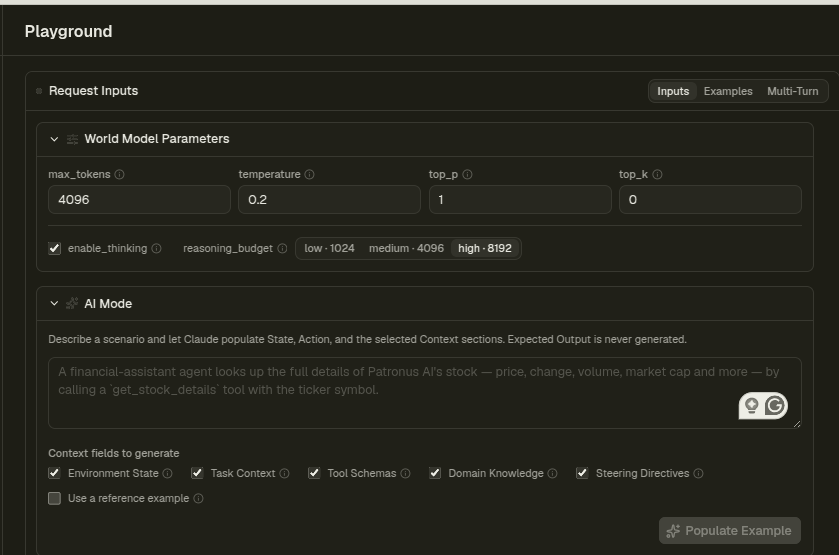
The Inputs tab shows the World Model Parameters at the top. These are the same sampling settings you would find on any language model.
- `temperature` is 0.2 to keep a structured tool response mostly consistent
- `max_tokens` is 4096 to leave room for the full JSON
- `enable_thinking` is checked with a `reasoning_budget` of high, which gives the model 8192 tokens to reason before it answers.
Thinking is on because this prediction requires arithmetic over the airline's rules. In testing, disabling thinking returned an `amount_due` of 181.0 that did not match the response's own cost breakdown, which sums to 145.0. See the companion notebook for both runs.
The Inputs tab also has an AI Mode panel. Describe a scenario in one line there, and Claude populates the input fields for you. For this example, we fill in inputs by hand.
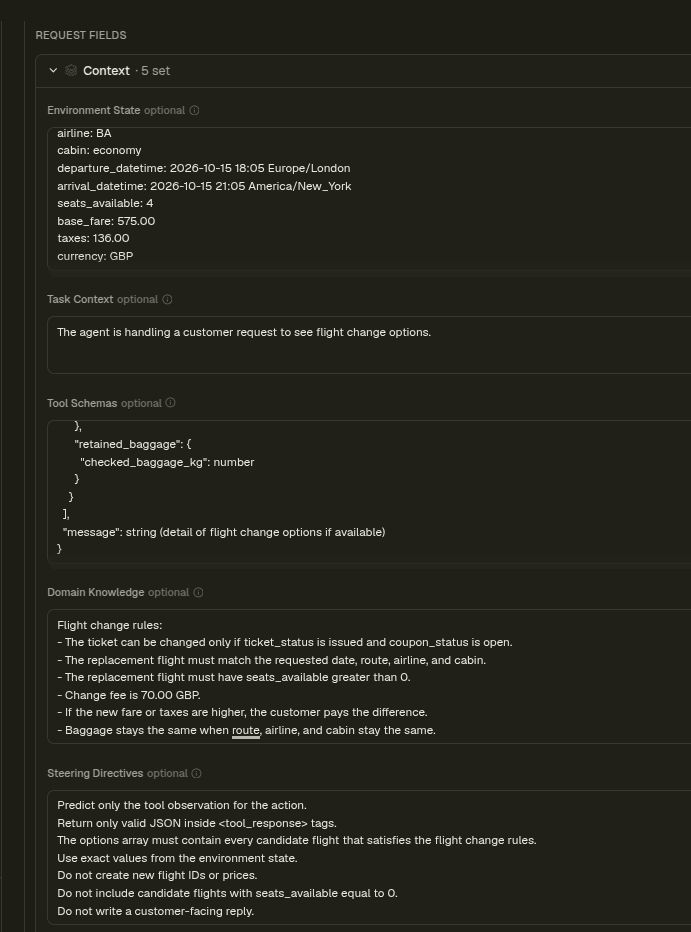
Next comes the context, where you describe the world in five fields, explained before.
- Environment State contains the current state of the data
- Task Context is the intent
- Tool Schemas is the output shape
- Domain Knowledge is the rules
- Steering Directives are the guardrails.
For this example, Environment State holds the booking snapshot and the two candidate flights, BA115 with zero seats available and BA179 with four. Domain Knowledge holds the airline's rules, such as the change fee of 70.00 and the rule that baggage stays the same when the airline, route, and cabin do not change. Tool Schemas describe the tool's signature and the exact JSON structure of its return value, which tells the model what shape its prediction should take.
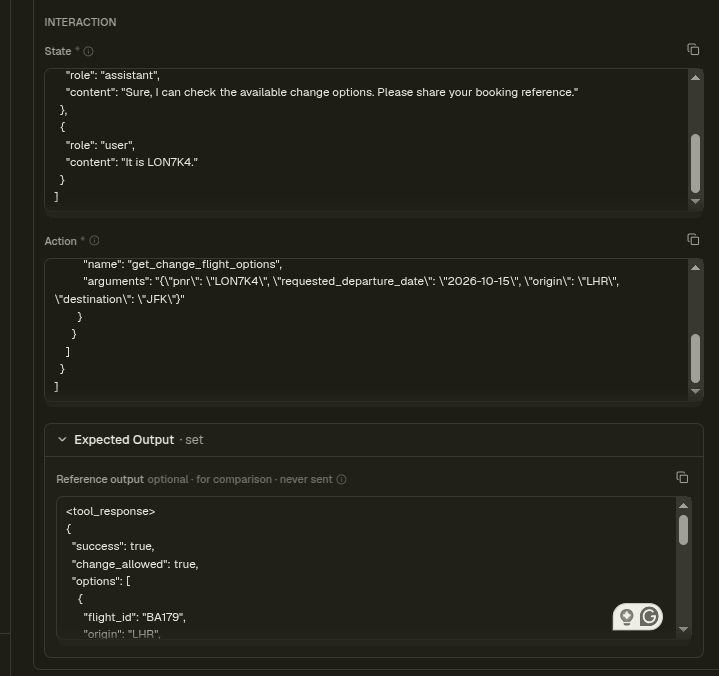
The Interaction section comes next, and it requires two fields: state and action.
- State is the conversation so far, given as a list of chat messages.
- Action is the single step the agent is about to take: an assistant message carrying the tool call and its arguments.
Finally, the expected output section holds an optional reference answer, which is only used for comparison and is never sent to the model.
Run the prediction by clicking the `Generate` button from the top left, and the Model Output section shows the actual vs expected output.
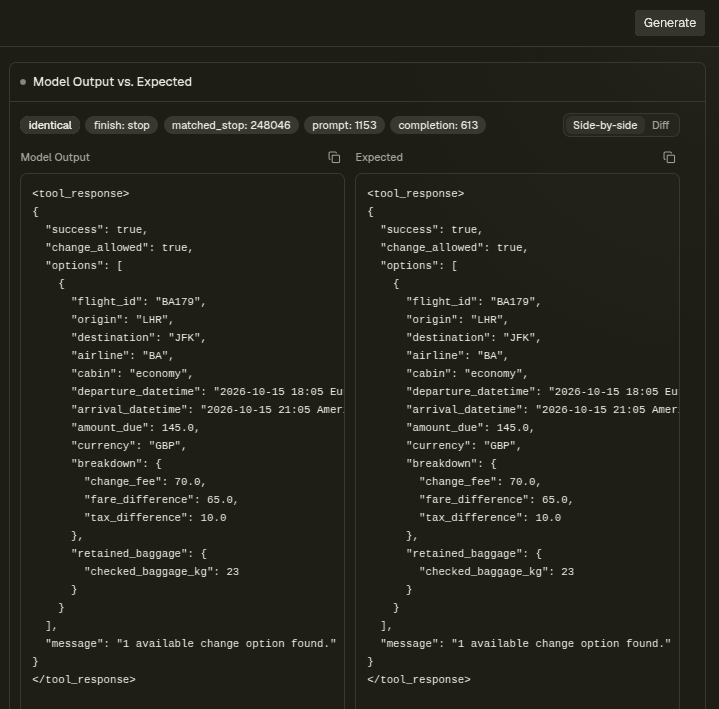
The output shows that flight BA115 was dropped because seats_available: 0 failed the seats rule, so only BA179 came back. The cost was computed from the rules: a change fee of 70, plus a fare difference of 65 (575 minus 510), plus a tax difference of 10 (136 minus 126), for an `amount_due` of 145.00 GBP. Baggage stayed at 23 kg because the airline, route, and cabin did not change. That is the airline backend's answer, produced without an airline backend.
Calling the API
Everything you did by hand in the Playground is also available from code. The Patronus DWM API is hosted at https://dwm.patronus.ai/v1. Every request goes to this base URL and carries your API key as a bearer token.
The API has two endpoints, and both return the same prediction. The native endpoint is `/predict`. The other is `/chat/completions`, which is OpenAI-compatible, so you can call it with the OpenAI client you already use.
Let’s see an example of calling the Patronus DWM API via Python. Note that the code runs inside a Google Colab notebook, so environment variables are stored as Colab secrets.
Note: You can find all the code in this section in this Google Colab notebook.
Step 1: Authenticate
Get an API key for Patronus DWM. In Colab, store it as a secret named `PATRONUS_DWM_API_KEY`. You can also store it in an environment variable if you are running this code locally.
Next, run the following script to import the required libraries in your Python code.
import os, re, json, time
import requests
from google.colab import userdata

# Pulls the secret named PATRONUS_DWM_API_KEY from Colab's Secrets panel
API_KEY = userdata.get('PATRONUS_DWM_API_KEY')
assert API_KEY, "Add PATRONUS_DWM_API_KEY in Colab's Secrets panel (key icon on the left sidebar) and grant this notebook access."

BASE_URL = "https://dwm.patronus.ai/v1"
HEADERS = {"Authorization": f"Bearer {API_KEY}", "Content-Type": "application/json"}
The base URL already includes `/v1`, and every request carries the key as a bearer token in the `Authorization` header.
Step 2: Describe the world with the five context sections
The `context` dictionary carries the same five sections you filled in by hand in the Playground, and each one is a plain string. The following code shows the values we fill in.
context = {
    "environment_state": """Booking system snapshot.

Existing booking:
pnr: LON7K4
passenger_name: Amina Shah
ticket_status: issued
coupon_status: open
origin: LHR
destination: JFK
airline: BA
cabin: economy
fare_basis: ESAVER
current_flight_id: BA113
current_departure_datetime: 2026-10-12 09:50 Europe/London
base_fare_paid: 510.00
taxes_paid: 126.00
currency: GBP
checked_baggage_kg: 23

System:
current_datetime: 2026-10-10 14:00 Europe/London

Requested change:
requested_departure_date: 2026-10-15
requested_origin: LHR
requested_destination: JFK
requested_airline: BA
requested_cabin: economy

Candidate flights:
flight_id: BA115
origin: LHR
destination: JFK
airline: BA
cabin: economy
departure_datetime: 2026-10-15 10:20 Europe/London
arrival_datetime: 2026-10-15 13:15 America/New_York
seats_available: 0
base_fare: 545.00
taxes: 132.00
currency: GBP

flight_id: BA179
origin: LHR
destination: JFK
airline: BA
cabin: economy
departure_datetime: 2026-10-15 18:05 Europe/London
arrival_datetime: 2026-10-15 21:05 America/New_York
seats_available: 4
base_fare: 575.00
taxes: 136.00
currency: GBP""",
    "task_context": "The user wants to see available flight change options for booking LON7K4.",
    "tool_schemas": """Tool: get_change_flight_options

Purpose:
Returns available replacement flight options for a booking change request.

Parameters:
- pnr: string
- requested_departure_date: string
- origin: string
- destination: string

Return JSON object:
{
  "success": boolean,
  "change_allowed": boolean,
  "options": [
    {
      "flight_id": string,
      "origin": string,
      "destination": string,
      "airline": string,
      "cabin": string,
      "departure_datetime": string,
      "arrival_datetime": string,
      "amount_due": number,
      "currency": string,
      "breakdown": {
        "change_fee": number,
        "fare_difference": number,
        "tax_difference": number
      },
      "retained_baggage": {
        "checked_baggage_kg": number
      }
    }
  ],
  "message": string
}""",
    "domain_knowledge": """Flight change rules:
- Ticket must have ticket_status issued and coupon_status open.
- Candidate flight must match requested date, origin, destination, airline, and cabin.
- Candidate flight must have seats_available greater than 0.
- Change fee is 70.00.
- Fare difference = candidate base_fare minus base_fare_paid, but only if positive.
- Tax difference = candidate taxes minus taxes_paid, but only if positive.
- Amount due = change fee + fare difference + tax difference.
- Baggage remains the same when airline, route, and cabin stay the same.""",
    "steering_directives": """Predict only the tool observation for the action.
Return only valid JSON inside <tool_response> tags.
The options array must contain every candidate flight that satisfies the flight change rules.
Use exact values from the environment state.
Do not create new flight IDs or prices.
Do not include candidate flights with seats_available equal to 0.
Do not write a customer-facing reply.""",
}
Notice how much work the steering directives do. They pin the output format, forbid invented flight IDs and prices, and rule out zero-seat candidates. Without them, the model tends to write a customer-facing reply, which is the wrong artifact for training an agent.
Step 3: Define the state and the action
As you saw in the Playground, you need to pass the current state and the action to the digital world model. In code, you pass them in the `interaction` object, which has two required fields. The `state` field holds the conversation so far, and the `action` field holds the single step the agent is about to take, which here is the assistant message carrying the tool call. Both are sent as JSON strings rather than raw lists.
state_messages = [
    {"role": "user", "content": "Hi, I want to move my London to New York flight to 15 October."},
    {"role": "assistant", "content": "Sure, I can check the available change options. Please share your booking reference."},
    {"role": "user", "content": "It is LON7K4."},
]

action_messages = [
    {
        "role": "assistant",
        "content": "",
        "tool_calls": [
            {
                "id": "call_change_options_001",
                "type": "function",
                "function": {
                    "name": "get_change_flight_options",
                    "arguments": json.dumps({           # tool-call arguments are themselves a JSON string
                        "pnr": "LON7K4",
                        "requested_departure_date": "2026-10-15",
                        "origin": "LHR",
                        "destination": "JFK",
                    }),
                },
            }
        ],
    }
]

interaction = {
    "state": json.dumps(state_messages),    # JSON string, not a raw list
    "action": json.dumps(action_messages),  # JSON string, not a raw list
}
Step 4: Call the /predict endpoint
Next, you make the prediction. The script below defines a `predict()` function that posts the request to the `/predict` endpoint, sets the sampling parameters, and then calls the function with the `context` and `interaction` from the previous two steps. The parameters are the same ones from the Playground run.
def predict(context, interaction, params, timeout=180):
    """Call the native /predict endpoint and return the parsed JSON response."""
    resp = requests.post(
        f"{BASE_URL}/predict",
        headers=HEADERS,
        json={"context": context, "interaction": interaction, "params": params},
        timeout=timeout,
    )
    resp.raise_for_status()
    return resp.json()

params = {
    "max_tokens": 4096, "temperature": 0.2, "top_p": 1, "top_k": 0,
    "enable_thinking": True, "reasoning_budget": "high",  # low=1024 | medium=4096 | high=8192 thinking tokens
}

result = predict(context, interaction, params)

print("finish_reason:", result["finish_reason"])   # "stop" = clean; "length" = hit max_tokens (unreliable)
print("usage:        ", result["usage"])
print("matched_stop: ", result["matched_stop"])
print("\n--- response.content (the predicted tool observation) ---\n")
print(result["response"]["content"])
Output:
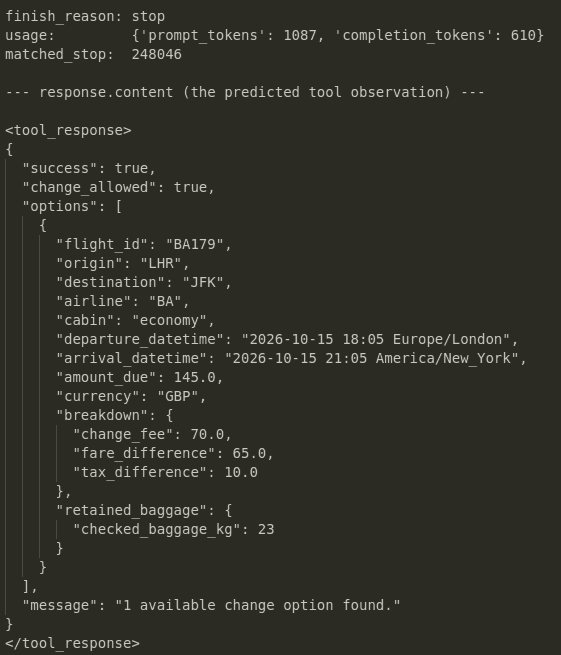
The above output shows the same prediction the Playground produced, in the shape the tool schema asked for: one option for BA179, an `amount_due` of 145.0 GBP with its cost breakdown, and baggage retained at 23 kg. No airline system was called at any point.
Because thinking was enabled, `/predict` returns the reasoning in a separate `reasoning` field, which keeps `response.content` clean enough to parse.
reasoning = result.get("reasoning")
print("reasoning present:", reasoning is not None)
if reasoning:
    print("\n--- reasoning (first 600 chars) ---\n")
    print(reasoning[:600], "...")
Output:
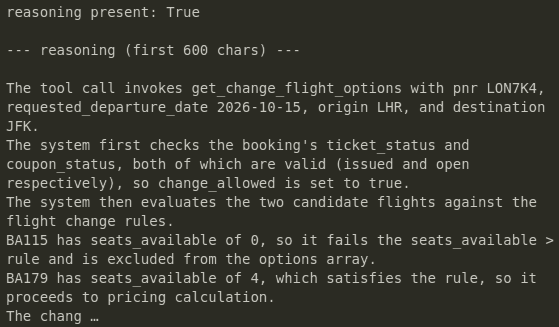
The reasoning tells you which rule the model applied at each decision, which is how you tell a correct answer apart from a lucky one when you are auditing simulation data at scale.
This is one example of using the Patronus digital world model from start to end through the API. The API does more than a single prediction, including the OpenAI-compatible endpoint, controls over the reasoning pass, and chaining predictions into a multi-turn trajectory. See the companion notebook to dig deeper into those, and the DWM API documentation for the full API functionality.
{{banner-dark-small-3="/banners"}}
Conclusion
A world model predicts how an action changes the state of an environment. Most of the world models in the news do that for the physical world, and the same principle holds for the digital one, where the state is a conversation, a database, or any software environment rather than a video frame, and the action is a tool call rather than a turn of the wheel.
A digital world model is a learned replacement for a brittle hand-built environment when you are training and testing tool-using agents: you describe the world in five sections, send a state and an action, and get back the observation the environment would have produced.
A digital world model can predict what a tool would return without ever touching the system behind it, and the same pattern works for any tool your agent calls. Explore the Patronus Digital World Model Playground to train and test your agents in a simulated environment, where a wrong tool call costs nothing and the failure cases you could never trigger in production become testable, rather than against a live system.