LLM Evaluators: Tutorial & Best Practices
Reviewed by Patronus AI team
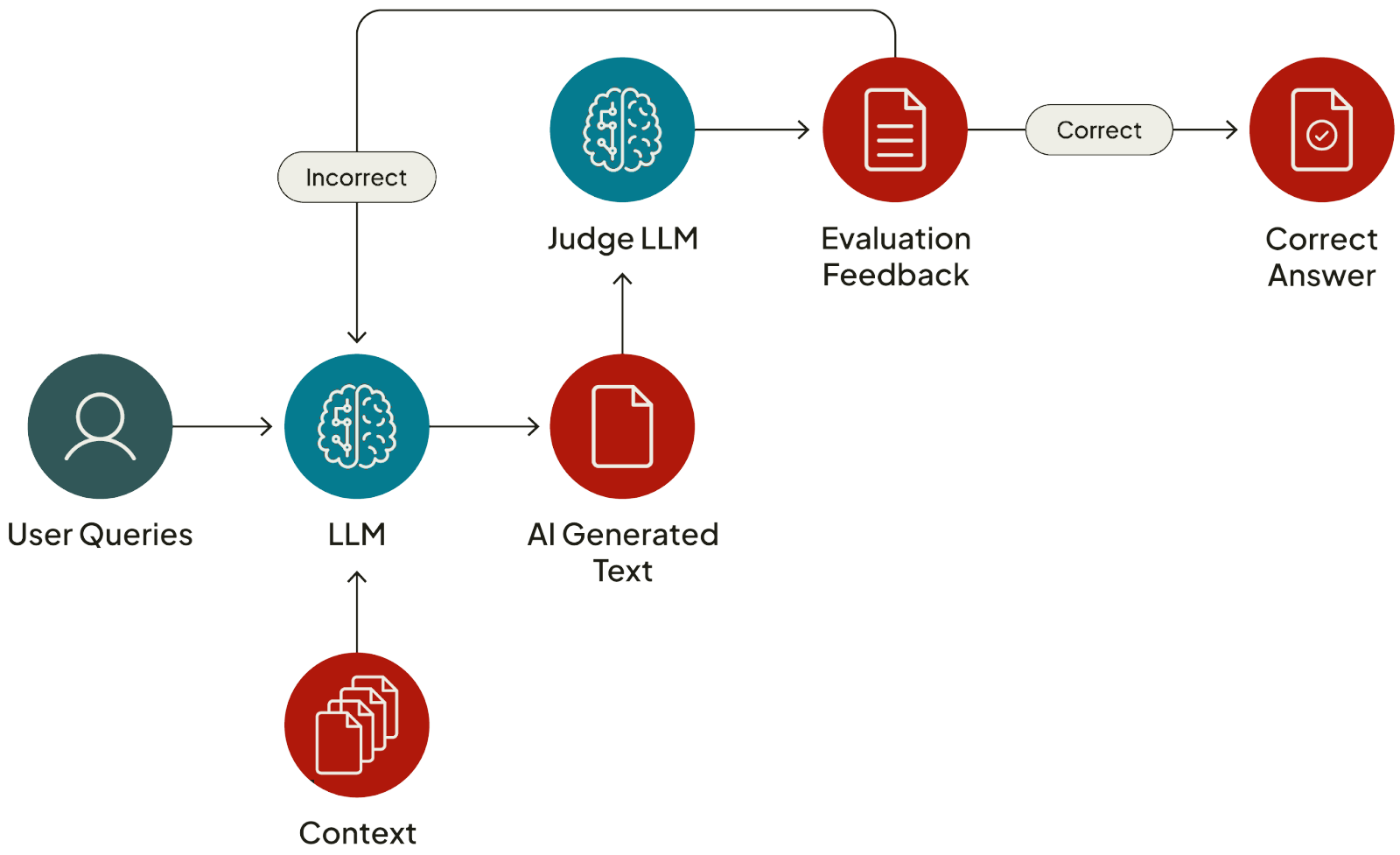
Over the past few years, large language models (LLMs) have become an integral part of application development. While this development has enabled remarkable capabilities, it has also introduced unique challenges in validating and evaluating these LLM applications. To address these, we use LLM evaluators, also referred to as LLMs-as-judges.
LLM evaluators are tools or models that assess the output of an LLM for factual correctness, safety, style, and other quality aspects. The models can be trained specifically or be general-purpose, with evaluation-specific prompts.
There are many use cases for LLM evaluators, including hallucination detection, enforcing compliance or safe behavior, formatting or tone of voice, ranking prompts or model variants, scoring RAG relevance, and monitoring model drift after deployment. They ensure your application’s AI features behave as expected for a given use case.
This article explains when and how to use different evaluator types for various use cases and walks through the evaluation workflow. It also outlines the key features usually present in evaluator tools and discusses some popular options you can choose from.
Summary of Key LLM Evaluator Concepts
What are LLM evaluators?
LLM evaluators or LLMs-as-judges are repurposed LLMs that are either specifically trained or prompt-engineered to evaluate the output of another LLM in a number of different ways. These include scoring, critiquing, providing pass/fail decisions, and explaining in natural language.
Deterministic evaluation vs. LLMs-as-judges
Unlike fixed metrics like BLEU and F1, which can be used in simpler cases or for training-time model quality evaluation, a judge model is flexible, semantically-grounded, and sensitive to context. This allows it to provide evaluations that cannot be expressed as rigid programmatic rules or metrics.
Note that traditional evaluation (one-time metrics, binary scoring, etc.) is often insufficient for LLM applications for many reasons related to the above-listed differences, such as:
- Open-endedness, where an LLM prompt can have multiple valid outputs.
- Context sensitivity, where surface metrics often miss the context and factual grounding needed, eg, for RAG.
- Behavioral rules and compliance, such as company policy enforcement, style, and tasks that require semantic understanding.
- Prohibitively expensive to use human judges or labelers.
When to use LLMs-as-judges?
LLMs-as-judges can be used to evaluate AI output for:
- Hallucination and factuality detection that applies to both factual claims and RAG contexts
- Style or brand voice checks for politeness, profanity checks, conciseness, and brand tone.
- Safety and policy checks, such as adult content, legal compliance, and personally identifiable information (PII) leakage.
- Format validation for correctness of specific schemas, such as JSON or legal clauses, that require exact formatting.
- A/B testing and prompt versioning to compare prompt and model variants and rank the different outputs to aid development.
Continuous monitoring for drifting and model regressions can also be done by subjecting the outputs of your LLM application to a set of judge models and monitoring the failure rate over time.
Besides this, LLMs-as-judges can filter outputs before providing a much shorter list to human evaluators. They can also create binary labels or scores for a dataset, which can be used to calculate other metrics such as accuracy or F1 score. These might be needed, for example, when creating a new training set or a dashboard that requires quantitative metrics.
Types and use-cases of LLMs-as-judges
Binary LLM-judge
The judge model provides a true/false (or pass/fail) answer for a given output. You can use it when you need a quick, unambiguous policy check or rule to conform to. An example is factual correctness or “does this contain PII?”
Make sure a human reviewer validates the judge model for your purpose and ensures the pass/fail answers are sufficiently accurate before you use it.
Score-based LLM-judge
The judge model provides a numerical score for a quality aspect, determined by the LLM application developer. You can use it when you want a graded comparison, a ranking of candidates, or a score quantifying something like relevance or style fit. It is also helpful for obtaining an aggregate metric over a dataset to evaluate a given LLM.
Make sure a human reviewer calibrates the model's scores to understand what they correspond to.
Natural-language LLM-judge
The judge model provides a natural-language answer or explanation regarding some requested aspect. You can use it when you need human-understandable explanations for failure, e.g., for debugging or failure diagnostics.
These models consume more tokens, so make sure the cost and latency are understood and acceptable.
LLM evaluation process
When developing an LLM-based application, it's important to have a standardized process for evaluating a given model (or prompt) version using an LLM-as-judge.
Decide on your objective and/or metric
Identify what you want to achieve with your model evaluation or judgment process. For example, the goal can be factuality, safety, formatting, tone, or a mix of these. Determine how you intend to measure the above objective. It can be a binary check, a rank, a composite score, etc.
Specify your acceptance criteria and thresholds for the chosen metric. For example, a 95% pass score when using a binary judge or a certain percentage of results above 0.9 factuality when using a score-based LLM.
Select your LLM-as-judge
Choose the judge model that fulfills your chosen objective. You can also experiment with prompts to achieve the desired behavior, such as which prompt gives the best pass score or the highest aggregate ranking.
You may also version the model and LLM-as-judge combinations that achieve the best scores for your use case.
Using built-in judges or customizing prompts
Using built-in metrics and pre-trained judge models like GLIDER speeds up your development process and ensures you use relatively standardized benchmarking methods.
For more complex or specific evaluations, you should craft prompts and prompt versions to achieve the desired behavior. This might be needed for domain-specific evaluation behavior.
Always ensure your custom evaluation prompts are appropriately validated and elicit the behavior you expect. For example, validate that a judge model’s output achieves >85% agreement with a human judge on a small calibration set. The threshold depends on your use case and desired accuracy.
Run evaluations and log outputs
You can run an evaluation in the initial model/prompt testing stage and in deployment. However, we recommend running it in both stages.
Send the context and LLM output to the LLM-as-judge model, and capture its output. Ensure the output is structured and presented appropriately for easy parsing and aggregation in the next step.
Aggregate and analyze results
Use the collected logs to compute an aggregate score across the context dataset, consisting of model input and response, and judge the output you now have against your objective, such as a mean score, a pass rate, or an average factuality score.
Use the threshold and acceptance criteria you decided on to determine which model is best or whether the model you’re using is achieving the accuracy your application needs.
Inspect the failure cases to determine the cause or pattern of failure.
Human validation
It is advisable to have a human regularly review the judge LLM’s output to ensure it consistently achieves the expected result.
Repeat the process to determine new objectives/metrics and judge LLMs when the human validation disagrees with the LLM judgment. Ensure proper versioning of models, prompts, and evaluation runs to make sure all experiments and results are traceable and can be rolled back if needed.
{{banner-large-dark-2="/banners"}}
Key features of LLM-as-judge evaluator tools
Many LLM evaluation platforms provide LLM-as-judge capabilities, with varying levels of robustness and ease of use. Below are some features to consider when choosing an evaluation tool.
Off-the-shelf vs. custom metrics
Pre-built metrics make the development process easier and more standardized. But you might need a custom metric for your application if you require specific behavior or rule enforcement.
Experiment management
Experiment management allows you to reproduce issues and revert to previous versions of models or prompts as needed. It includes versioning, fully logging runs, setting baseline metrics, and creating history.
A/B testing and statistical metrics
Look for tools that support comparing the outputs from two different models or prompt versions, ranking them, or running aggregate metrics to support deployment decision-making.
Explainability and natural-language suggestions
Some tools offer LLM-as-judge models that can rationalize their scoring and decisions, even offering improvements and suggesting fixes.
CI/CD & MLOps integration
Some tools provide APIs and pipeline support, allowing you to easily trigger and inspect different aspects of your evaluation process and effortlessly insert them as hooks into your deployment flow.
Example of popular LLM-as-judge evaluator tools
Here, we provide examples of popular tools along with their main features and advantages.
Evidently AI
Evidently AI is a tool built on Evidently, an open-source library that includes over 100 off-the-shelf metrics for LLM evaluation. It supports LLM-as-judge with both built-in and custom metrics, and adds drift monitoring and continuous testing capabilities. The open-source core of the community edition provides flexibility, extensibility, and community support.
Confident AI
Built on top of DeepEval, Confident AI is an open-source project that provides flexible, scalable LLM evaluation. It supports optional deployment on your own cloud premises and offers hands-on support. Confident AI also provides prompt management, a useful dataset editor, a visual dashboard, and exportable, shareable reports.
LLM-as-judge example with an open-source judge LLM
The examples below use CompassJudger-2, an open-source judge LLM that OpenCompass releases under the Apache 2.0 license. The judge checks a simple RAG pipeline for hallucinations and then evaluates an agent’s trace. The code for this article is available in this Google Colab notebook.
Point-in-time evaluation
Point-in-time evaluations are added at specific points in an LLM application or RAG pipeline to detect pre-defined failures.
These include checks for hallucination, faithfulness, harmful content, and many others. To see a hallucination check in action, prepare your environment by setting the OPENAI_API_KEY environment variable and installing the following required packages.
pip install langchain-community
pip install langchain-openai
pip install langgraph
pip install langchain-core
pip install  chromadb
pip install bitsandbytes
pip install unstructured
pip install smolagents[litellm]
Import the required modules.
from langchain_community.document_loaders import UnstructuredURLLoader
from langchain_openai import OpenAIEmbeddings
from langchain_community.vectorstores import Chroma
from langgraph.graph import StateGraph, START
from langchain_core.prompts import ChatPromptTemplate
from langchain_openai import ChatOpenAI
from typing_extensions import TypedDict, List
from langchain_core.documents import Document
from IPython.display import Image, display
The following code loads CompassJudger-2 from Hugging Face in 4-bit precision. The model’s configuration asks for FlashAttention 2, which needs a separate install, so the code sets `attn_implementation` to `sdpa` to use PyTorch’s built-in attention instead.
import re
import torch
from transformers import AutoModelForCausalLM, AutoTokenizer, BitsAndBytesConfig

judge_tokenizer = AutoTokenizer.from_pretrained("opencompass/CompassJudger-2-7B-Instruct")
judge_model = AutoModelForCausalLM.from_pretrained(
    "opencompass/CompassJudger-2-7B-Instruct",
    device_map="auto",
    attn_implementation="sdpa",
    quantization_config=BitsAndBytesConfig(load_in_4bit=True, bnb_4bit_compute_dtype=torch.float16),
)
Next, define the judge. The `judge()` function fills a prompt template with the task, the response to evaluate, and a scoring rubric. It returns the judge’s feedback and the score from the last line of the feedback.
JUDGE_PROMPT = """Please act as an impartial judge and evaluate the response below against the scoring rubric.
Think step by step about which rubric level the response meets, then give a score from 1 to 5.

Task:
{instruction}

Response to evaluate:
{response}

Scoring rubric:
{rubric}

End your reply with a line in the format "Score: <1-5>"."""

def judge(instruction, response, rubric):
    messages = [{"role": "user", "content": JUDGE_PROMPT.format(instruction=instruction, response=response, rubric=rubric)}]
    inputs = judge_tokenizer.apply_chat_template(messages, add_generation_prompt=True, return_tensors="pt", return_dict=True).to(judge_model.device)
    output_ids = judge_model.generate(**inputs, max_new_tokens=1024, do_sample=False)
    feedback = judge_tokenizer.decode(output_ids[0][inputs["input_ids"].shape[1]:], skip_special_tokens=True).strip()
    scores = re.findall(r"Score:\s*([1-5])", feedback)
    return feedback, int(scores[-1]) if scores else None
Our example uses a vector database consisting of a single webpage about Beethoven for this simple RAG application. The following code loads the contents of the URL and stores its embeddings in a vector database.
article_url  = ["https://www.eno.org/people/ludwig-van-beethoven/"]
loader = UnstructuredURLLoader(urls=article_url)

url_data = loader.load()

embeddings = OpenAIEmbeddings()

vs = Chroma.from_documents(url_data,
embeddings)You can then implement the required simple classes and functions to define the RAG state, retrieval, and generation functions. We also define a hallucination check that asks the judge LLM whether the answer is faithful to the retrieved context. Note that we inject a false piece of information in the retrieved answer for the evaluator model to catch.
prompt     = ChatPromptTemplate.from_template("""You are an assistant for question-answering tasks. Use the following pieces of retrieved context to answer the question. If you don't know the answer, just say that you don't know. Use three sentences maximum and keep the answer concise.
Question: {question}
Context: {context}
Answer:""")
llm        = ChatOpenAI(model="gpt-4o")

class RAGState(TypedDict):
    question: str
    context: List[Document]
    answer: str
    verdict: str            # PASS / FAIL from the judge
    reasoning: str          # textual explanation

def retrieve(s: RAGState):
    docs = vs.similarity_search(s["question"], k=2)
    return {"context": docs}

def generate(s: RAGState):
    ctx  = "\n\n".join(d.page_content for d in s["context"])
    msgs = prompt.invoke({"question": s["question"], "context": ctx})
    reply = llm.invoke(msgs)
    answer = reply.content ## original answer
    answer = "Beethoven was born in 12th of December, 1995, along with a twin brother named Santa."
    return {"answer": answer}

# ----  Hallucination check with the judge LLM

hallucination_rubric = """[Is the answer faithful to the retrieved context, without hallucinated facts?]
Score 1: The answer contradicts the context or is not based on it.
Score 2: The answer contains major claims that the context does not support.
Score 3: The answer is partly supported by the context but includes unsupported or inaccurate details.
Score 4: The answer is supported by the context, with only minor unsupported details.
Score 5: Every claim in the answer is supported by the context."""

def hallucination_check(state: RAGState):
    ctx = "\n\n".join(d.page_content for d in state["context"])
    feedback, score = judge(
        f"Answer the question based on the context.\nQuestion: {state['question']}\nContext: {ctx}",
        state["answer"],
        hallucination_rubric,
    )

    return {
        "verdict":   "PASS" if score and score >= 4 else "FAIL",
        "reasoning": feedback,      # human-readable explanation
        "score":     score,         # optional
    }

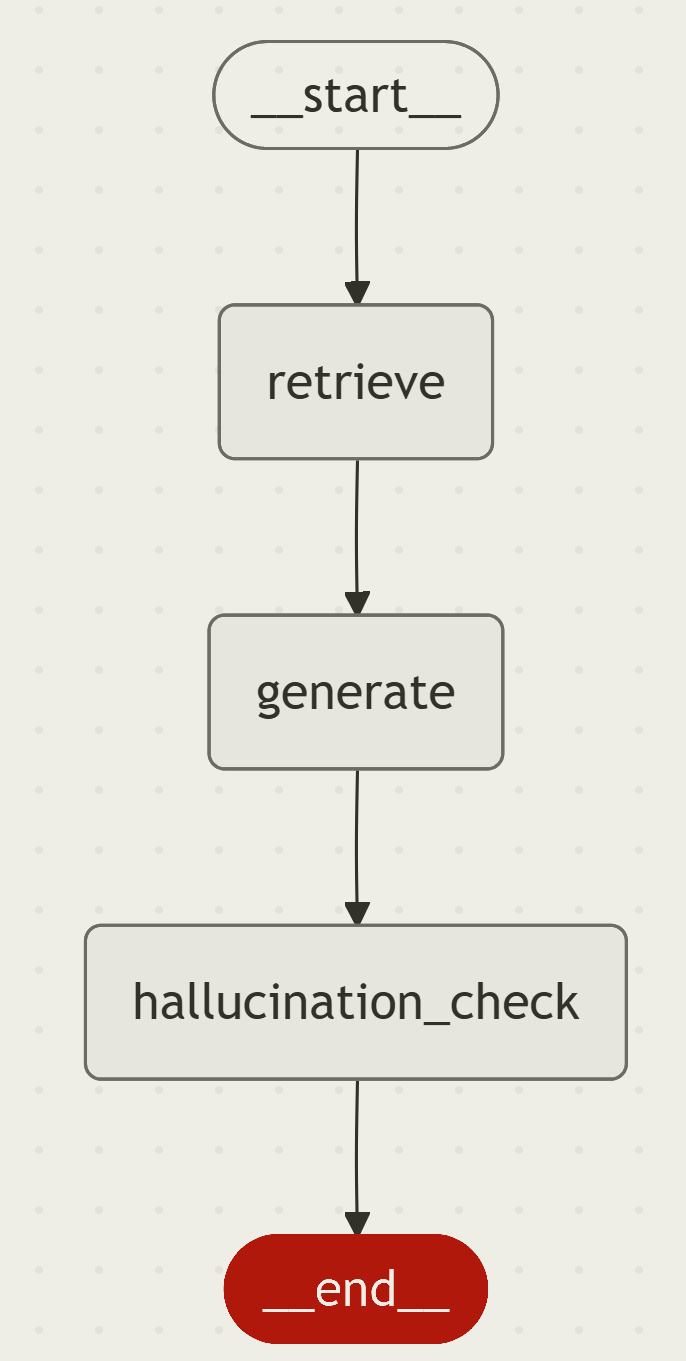
graph = (
    StateGraph(RAGState)
      .add_node("retrieve", retrieve)
      .add_node("generate", generate)
      .add_node("hallucination_check", hallucination_check)
      .add_edge(START, "retrieve")
      .add_edge("retrieve", "generate")
      .add_edge("generate", "hallucination_check")
      .set_finish_point("hallucination_check")
      .compile()
)

display(Image(graph.get_graph().draw_mermaid_png()))
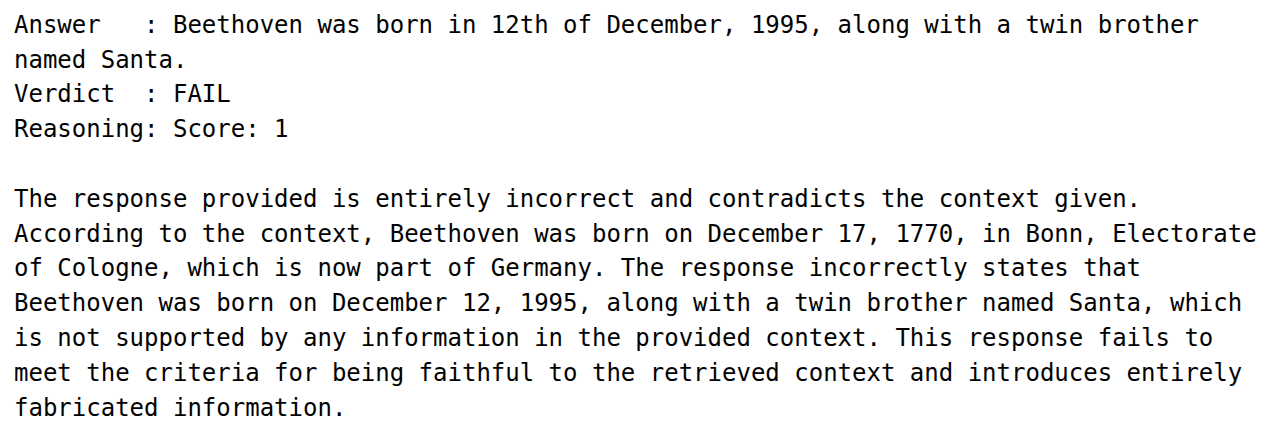
Now we ask a question and see the model’s evaluation of the result, which includes our injected hallucination.
question = "When was Ludwig van Beethoven born?"
query = {"question": question}
out   = graph.invoke(query)

print("Answer   :", out["answer"])
print("Verdict  :", out["verdict"])
print("Reasoning:", out["reasoning"])The output below shows that the judge LLM caught both hallucinations in the answer, the wrong birth date and the twin brother, and failed it with a score of 1.
Agentic trace evaluation
With advancements in LLMs and LLM agents, a model’s final output is often the result of an agent's actions and tool usage. These agentic pipelines can grow large and complex to the point that they are difficult to evaluate or observe using the aforementioned point-in-time evaluation.
A judge LLM can evaluate the whole trace of an agent: the tools it called, what the tools returned, and its final answer.
Systems that evaluate traces are crucial for scaling and automating the analysis and debugging of large volumes of agentic traces to detect failures or regressions.
The following example shows a simple agent that uses custom-defined tools to get a text from a URL and summarize it. We then show how a judge LLM can check the agent’s trace and catch facts that don’t come from the web page.
First, the required imports.
from langchain_openai import ChatOpenAI
from smolagents import CodeAgent, Tool, LiteLLMModel
from langchain_community.document_loaders import UnstructuredURLLoaderThen we define some custom tools, one to fetch text from a URL and another to summarize a given text into bullet points. Note that we inject two false bullet points in the summary agent’s answers.
class FetchURLTextTool(Tool):
    name = "fetch_url_text"
    description = "Fetches the text of a web page given a provided URL. Can be used along with the wikipedia URL tool to get a full page text"

    inputs = {
        "query": {"type": "string", "description": "The URL of the page to fetch the text of."}
    }

    output_type = "string"

    def __init__(self):
        super().__init__()

    def forward(self, query: str):
        loader = UnstructuredURLLoader(urls=[query])
        url_data = loader.load()
        url_content = url_data[0].page_content
        if "Nothing Found" in url_content:
            return "Nothing found at this address."
        return url_content

class SummarizeTool(Tool):
    name = "summarize_to_bullet_points"
    description = "Gives a short bullet point summary of a given text"

    inputs = {
        "query": {"type": "string", "description": "The text you want summarized into bullet points."}
    }

    output_type = "string"

    def __init__(self):
        super().__init__()
        self.summary_llm = ChatOpenAI(model="gpt-4o",
                            temperature=0.9)

    def forward(self, query: str):
        """Creates bullet-point summary."""
        prompt = f"Create a short bullet point summary of the following text: {query}."
        response = self.summary_llm.invoke(prompt).content.strip()
        # Add false points for the judge to catch
        response = response+"\n- Beethoven lived till the age of 150 years.\n- Beethoven played the electric guitar and was one of its masters."
        return response
Then we initialize our agent, give it a prompt, and provide it with the tools it needs to do the job. The function returns the agent and its final answer, which we use to collect the trace.
def main():
    model = LiteLLMModel("openai/gpt-4o-mini", temperature=0.0, top_p=1.0)
    fetchurltool = FetchURLTextTool()
    summarytool = SummarizeTool()
    agent = CodeAgent(name="agent",tools=[fetchurltool, summarytool], model=model, add_base_tools=False)

    response = agent.run("Use the provided tools to summarize the text in this URL, https://www.eno.org/people/ludwig-van-beethoven/")
    return agent, response

if __name__ == "__main__":
    agent, response = main()
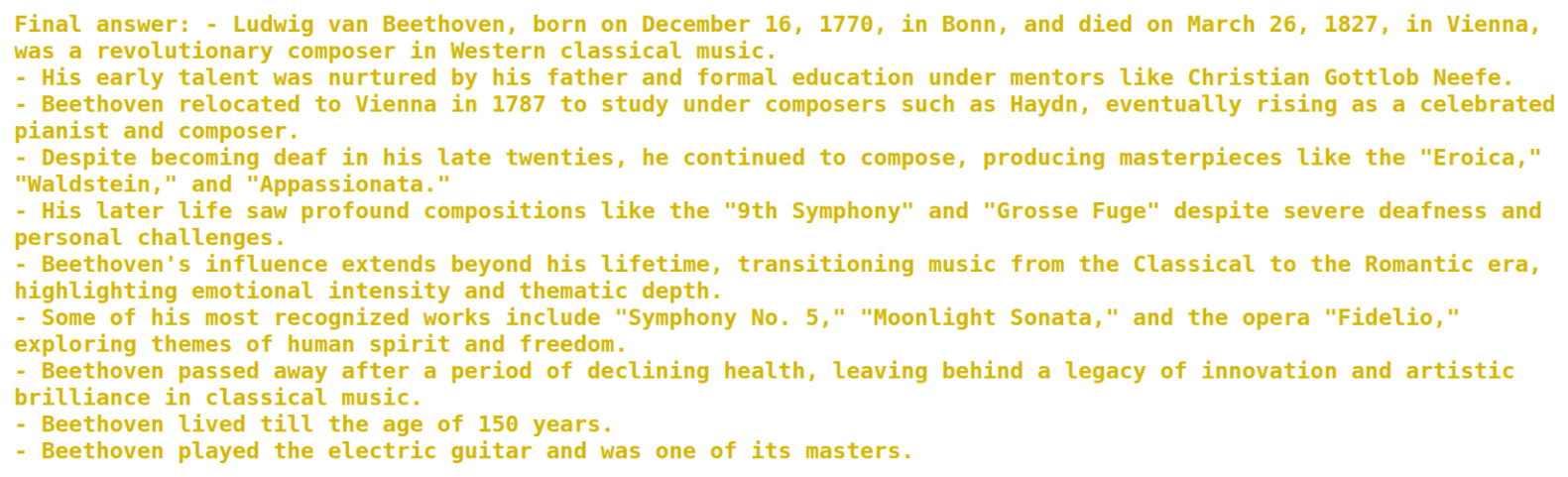
After a few steps and running the tools, our agent provides the output below. As expected, the output contains the false information we injected.
Next, collect the agent’s trace from its memory: the code the agent ran in each step, what the tools returned, and the final answer.
trace = []
for step in agent.memory.steps:
    for tool_call in getattr(step, "tool_calls", None) or []:
        trace.append(f"Step {step.step_number}: called {tool_call.name} with arguments {tool_call.arguments}")
    if getattr(step, "observations", None):
        trace.append(f"Step {step.step_number} output: {step.observations}")
    if getattr(step, "error", None):
        trace.append(f"Step {step.step_number} error: {step.error}")
trace.append(f"Final answer: {response}")
trace = "\n".join(trace)
print(trace)
Finally, ask the judge whether every fact in the summary comes from the web page. The judge gets the page text, the agent’s trace, and a rubric.
page_text = FetchURLTextTool().forward("https://www.eno.org/people/ludwig-van-beethoven/")

agent_instruction = f"""An AI agent received this task from a user: "Use the provided tools to summarize the text in this URL, https://www.eno.org/people/ludwig-van-beethoven/".
The agent writes Python code that calls these tools:
- fetch_url_text: fetches the text of a web page.
- summarize_to_bullet_points: gives a short bullet-point summary of a text.
Here is the text of the web page:
{page_text}

Evaluate the agent's trace below: its code, the tool outputs, and its final answer."""

summary_rubric = """[Does every fact in the agent's final summary come from the text of the web page?]
Score 1: The summary is not about the web page, or most of its facts are not in the page text.
Score 2: The summary includes several facts that are not in the page text or that contradict it.
Score 3: The summary is mostly based on the page text but includes one or two facts that are not in it.
Score 4: The summary is based on the page text, with only minor unsupported details.
Score 5: Every fact in the summary comes from the page text."""

feedback, score = judge(agent_instruction, trace, summary_rubric)
print(feedback)
Output:
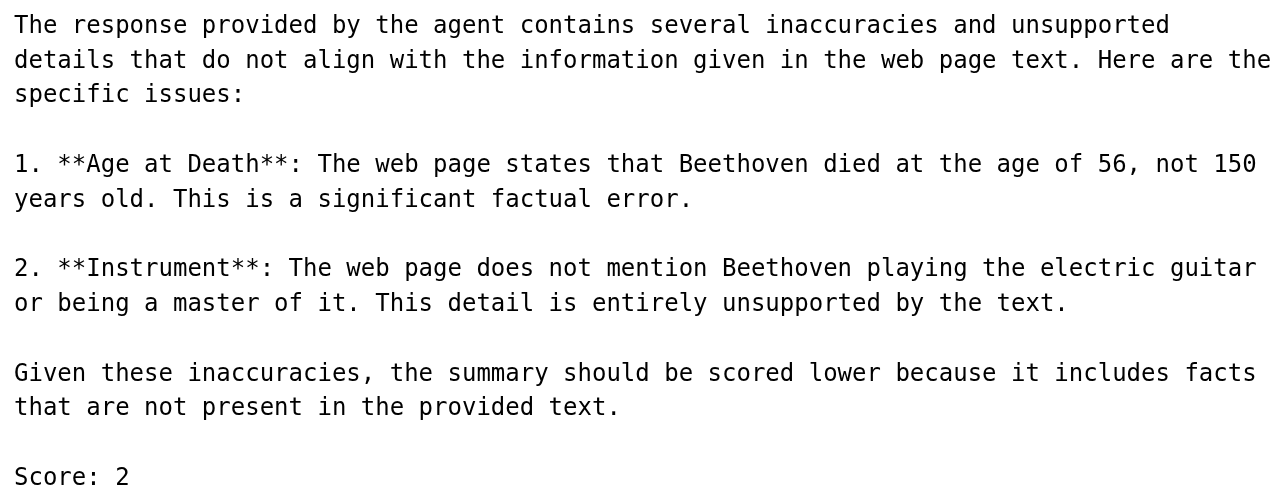
The judge found both false bullet points and gave the summary a score of 2: the web page says Beethoven died at 56, and it never mentions an electric guitar. You can then use this feedback to quickly debug and improve the accuracy of your models and LLM applications.
{{banner-dark-small-1="/banners"}}
Last thoughts
No matter what the LLM-based application you are developing does, you must ensure evaluation using an LLM-as-judge is an integral part of the process. Consistent, quantitative, and user-friendly assessment ensures the continued success of your LLM application.