

Agentic Memory: Types, Management Strategies, and LangGraph Implementation
Agentic memory is a mechanism that enables AI agents to store, recall, and use information across multiple interactions. It enables retrieving relevant memories from external persistent storage and injects them into the LLM's context window at inference time. Agents can maintain continuity, personalize responses, and learn from past experiences.
Every call to an LLM is a new start, with no knowledge of prior conversations unless this information is explicitly stored and re-supplied in subsequent calls. Without memory, agents cannot learn from feedback, recall user preferences, or maintain context across sessions. This makes them unsuitable for most production applications that require continuity.
This article explains why agents need memory, how agentic memory differs from traditional chatbot memory, and the five key memory types: semantic, episodic, procedural, short-term, and long-term.
You will also see practical memory management strategies and a complete implementation using LangGraph. Finally, you will also study how to use a third-party AI debugging tool to verify whether a RAG application generates responses grounded in memory.
Summary of key agentic memory concepts
{{banner-large-dark-2="/banners"}}
Why AI agents need memory
LLMs process each request independently. There is no built-in mechanism for carrying forward information from one interaction to the next. This statelessness makes agents unsuitable for multi-turn workflows, personalization, and any task requiring continuity.
For example, consider a scenario where you tell an HR assistant agent your employee ID and ask about your leave balance. In a stateless system, if you follow up with "Am I eligible for a bonus?", the agent has already forgotten who you are. You would need to provide your employee ID again. Every turn starts from zero.
Memory addresses the stateless problem and enables agents to maintain continuity across turns and sessions. It allows them to handle follow-up questions and multi-step tasks. It also enables personalization, allowing the agent to remember user preferences, history, and profile data to tailor responses.
Agents with memory learn from feedback by storing corrections and adapting behavior over time without retraining. Memory also supports efficient reasoning by avoiding the need to re-retrieve or recompute information the agent has already encountered.
How agentic memory differs from traditional LLM memory
Traditional chatbot memory typically amounts to injecting recent conversation history into the prompt. Agentic memory is fundamentally different in scope, control, and capability. The following table breaks down the key distinctions.
The key distinction is that in agentic memory, the agent itself decides what to remember, when to recall it, and when to discard it. This is typically done through tool calls exposed as memory operations, such as add memory, retrieve memory, update memory, and delete memory.
Agentic memory types
Agentic memory is divided into two broad categories: short-term memory and long-term memory.
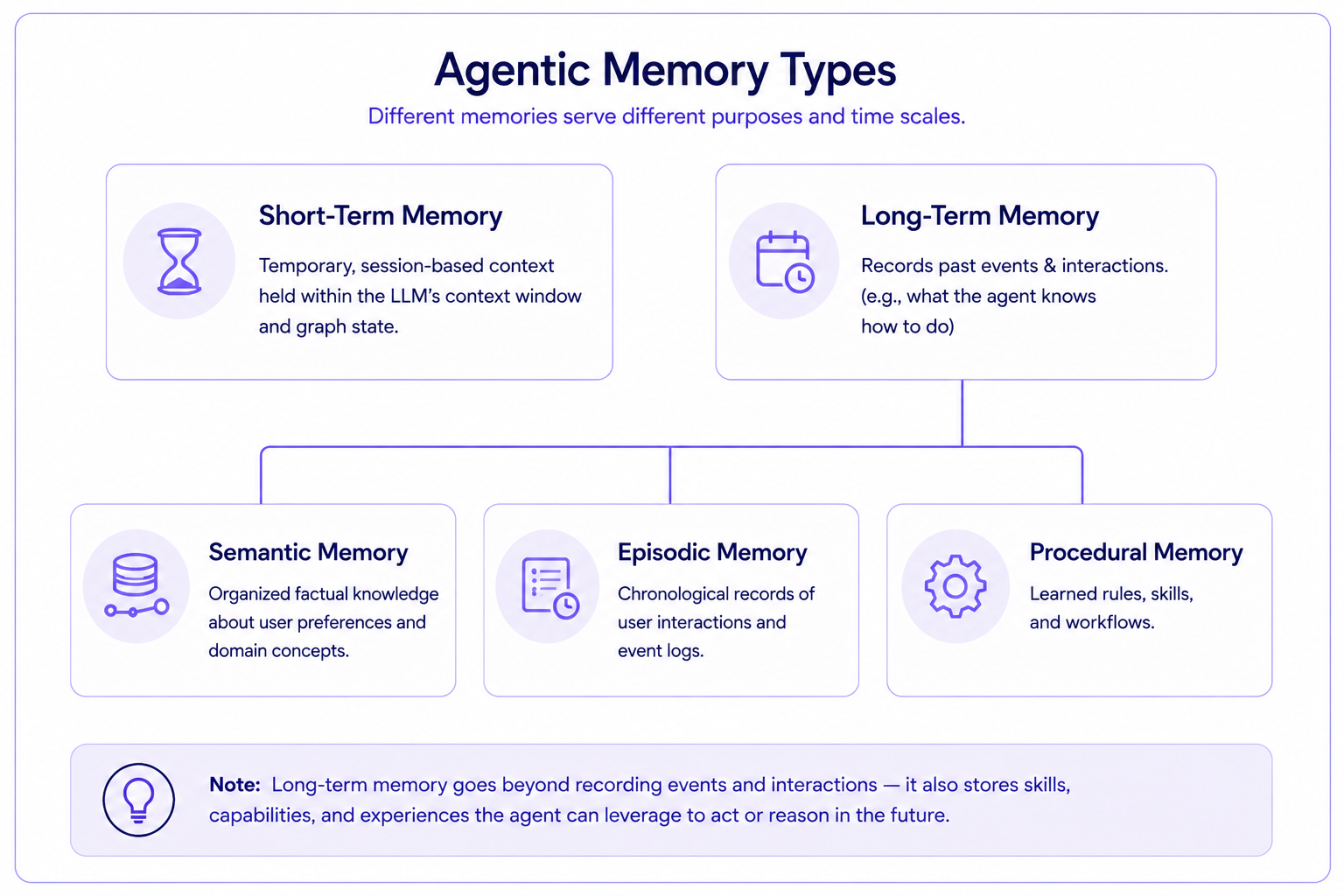
Short-term memory (working memory)
Short-term memory is the agent's temporary workspace for the current session. It holds conversation history, intermediate reasoning steps, and tool outputs. In tools like LangGraph, this is implemented via the LLM's context window or graph state using thread-scoped checkpoints.
Short-term memory is cleared when the session ends. It does not persist across conversations. The main challenge is that context windows are finite. Long conversations exceed token limits, which requires truncation or summarization strategies to keep things manageable.
Long-term memory
Long-term memory is persistent storage that survives across sessions. It is organized into three sub-types: semantic, episodic, and procedural.
Semantic memory
Semantic memory stores structured factual knowledge: user preferences, domain facts, and entity relationships. It is analogous to a personal knowledge base that the agent can query. Common implementations include vector embeddings for semantic search, knowledge graphs for relational data, or key-value stores for structured facts.
For example, semantic memory would store the fact that a user is a Senior Engineer in the Engineering department who prefers concise answers.
Episodic memory
Episodic memory records specific past events and interactions as timestamped logs. It stores what happened, the actions the agent took, and the outcomes. You get case-based reasoning: the agent recalls similar past situations to inform current decisions.
For example, the agent might recall that the last time a user asked about deployment, it successfully used the CI/CD tool but failed on the first attempt due to a missing config file.
Procedural memory
Procedural memory encodes learned skills, rules, and behavioral patterns. It is the agent's "how-to" knowledge. It allows agents to execute tasks automatically without re-reasoning from scratch. You can implement this through updated system prompts, learned instruction sets, or executable workflow templates.
For example, after receiving feedback that responses should include code examples, the agent updates its procedural memory to always include code snippets when answering technical questions.
Agentic memory management approaches
As conversations grow and knowledge accumulates, memory must be managed to prevent context bloat, excess token usage, and degraded reasoning quality. There are several main strategies.
Sliding window (truncation)
This approach keeps only the most recent N messages in context. Oldest messages are dropped. It is simple and efficient, but risks losing critical early context. Sliding window works best for short, task-focused interactions where recent context is sufficient.
Conversation summarization
This strategy periodically compresses older conversation history into a concise summary, preserving key facts while reducing token usage.
While messages are not dropped, nuanced details are still lost. However, the agent still has key information to work with over the long term.
Fact extraction
Fact extraction pulls key facts, entities, and preferences from conversations and stores them as structured records. Facts are stored separately from raw conversation history and retrieved on demand.
It is more precise than summarization: it stores "User prefers Python" rather than a paragraph-long summary. It works best for building semantic memory from interactions.
Retrieval-augmented recall
This approach stores relevant chunks of conversation history and knowledge in an external database such as a vector store or knowledge graph. At each turn, only the most relevant memories are retrieved based on the current query using semantic similarity. It scales well because the memory store grows independently of the context window. It works best for production systems that need to handle large volumes of accumulated knowledge.
Hybrid approaches
Most production systems combine multiple strategies: a sliding window for immediate context, summarization for medium-term recall, and retrieval for long-term knowledge. Some systems also use asynchronous "sleep-time" agents that manage memory in the background, reorganizing, consolidating, and pruning stored knowledge during idle periods.
Agentic memory implementation in LangGraph
Let’s implement the agentic memory concepts discussed above using a memory-enabled agentic RAG application in LangGraph. The agent serves as an HR assistant, answering questions about company leave, promotion, and bonus policies. Unlike a traditional RAG pipeline, this agent can remember user details across turns and across separate conversation sessions.
Note: The codes for this article are available in this GitHub repository. These concepts remain uniform for other orchestration tools such as SmolAgents, Llama Index, and others.
LangGraph memory architecture overview
LangGraph provides two built-in mechanisms for memory. Short-term memory is managed by a checkpointer (memory saver) that persists the full message history within a single conversation thread. As long as the thread_id stays the same, the agent has access to everything mentioned in that thread.
Long-term memory is handled through a cross-thread key-value store, called the memory store. Data written to the store is available from any thread. The store organizes data using namespaces (similar to folders) and keys (similar to filenames), so the agent can store structured facts and retrieve them later.
The combination of these two gives the agent both within-session continuity and cross-session recall.
Step 1: Installing and importing required libraries
Run the scripts below to install and import the required libraries.
!pip install -q langgraph langchain langchain-openai langchain-community
!pip install -q chromadb
!pip install -q langchain-chroma
!pip install -q pypdf
import os
from langchain_openai import ChatOpenAI, OpenAIEmbeddings
from langchain_core.tools import tool
from langchain_core.messages import HumanMessage
from langchain_chroma import Chroma
from langchain_community.document_loaders import PyPDFLoader
from langchain_text_splitters import RecursiveCharacterTextSplitter
from langgraph.prebuilt import create_react_agent
from langgraph.checkpoint.memory import MemorySaver
from langgraph.store.memory import InMemoryStore

import warnings
warnings.filterwarnings("ignore")
This example uses the OpenAI GPT-4o model for reasoning. You can use any other model as well. You will need to store the OpenAI API key in the `OPENAI_API_KEY` environment variable before running the following code.
llm = ChatOpenAI(model="gpt-4o", temperature=0)Step 2: Set up a vector database for company policies
We will ingest two dummy documents containing a company leave policy and a company promotion/bonus policy into a vector database. The RAG agent will retrieve this information to answer user queries.
text_splitter = RecursiveCharacterTextSplitter(
    chunk_size=500,
    chunk_overlap=100,
    length_function=len
)
LEAVE_POLICY_PDF_PATH = "Company_Leave_Policies_Extended.pdf"
PROMOTION_BONUS_PDF_PATH = "Company_Promotion_Bonus_Policies_Enterprise_Grade.pdf"
def load_merged_vectorstore(pdf_paths):
all_documents = []
for pdf_path in pdf_paths:
if not os.path.exists(pdf_path):
print(f"Warning: PDF not found at {pdf_path}")
continue
loader = PyPDFLoader(pdf_path)
documents = loader.load()
all_documents.extend(documents)
print(f"Loaded {len(documents)} pages from {os.path.basename(pdf_path)}")
if not all_documents:
print("No documents loaded!")
return None
split_docs = text_splitter.split_documents(all_documents)
embeddings = OpenAIEmbeddings()
vectorstore = Chroma.from_documents(
documents=split_docs,
embedding=embeddings,
collection_name="company_policies",
persist_directory="./chroma_db_memory_rag"
)
print(f"\nTotal: {len(all_documents)} pages, split into {len(split_docs)} chunks")
return vectorstore
vectorstore = load_merged_vectorstore([LEAVE_POLICY_PDF_PATH, PROMOTION_BONUS_PDF_PATH])
retriever = vectorstore.as_retriever(search_kwargs={"k": 3}) if vectorstore else NoneStep 3: Define the RAG tool
The agent needs a tool to search the policy vector database. Unlike a traditional RAG pipeline, where retrieval is a fixed step in a graph, here the agent decides when and whether to call this tool based on its reasoning.
@tool
def search_company_policies(question: str) -> str:
    """Search company policy documents (leave, promotion, bonus) for relevant information.

    Args:
        question: The question to search for in policy documents
    """
    if retriever is None:
        return "No policy documents loaded."

    docs = retriever.invoke(question)
    context = "\n\n".join([doc.page_content for doc in docs])

    return f"Relevant Policy Information:\n{context}"
Step 4: Define memory tools
This is where the implementation diverges from a standard agentic RAG setup. We initialize an InMemoryStore for cross-session persistence, then define three tools that let the agent manage its own memory. In production, you will use a persistent memory store such as PostgreSQL.
store = InMemoryStore()Next, we define three tools for memory management.
The `save_memory` tool writes a key-value pair to the store. The agent uses it to record new facts about the user, such as their role or seniority level. It also handles contradictions: when a user corrects previously stored information (for example, "I got promoted to Senior"), the agent calls save_memory with the same key, and the new value overwrites the old one.
@tool
def save_memory(key: str, value: str) -> str:
    """Save or update a piece of information in long-term memory.
    Use this to remember user details, preferences, or any fact
    that should persist across conversations. If the key already
    exists, its value will be overwritten -- use this behavior to
    handle corrections (e.g., role changes, updated preferences).

    Args:
        key: A descriptive key (e.g., 'user_role', 'department', 'preference')
        value: The information to remember
    """
    store.put(("memory",), key, {"content": value})
    return f"Saved to memory: {key} = {value}"
The `recall_memories` tool retrieves everything stored in the memory namespace. The agent calls this at the start of each conversation to see if it already knows anything about the user.
@tool
def recall_memories() -> str:
    """Retrieve all stored memories.
    Use this at the start of a conversation to check if there is
    any prior context about the user.
    """
    memories = store.search(("memory",))
    if not memories:
        return "No memories found."
    result = "Stored memories:\n"
    for mem in memories:
        result += f"  {mem.key}: {mem.value['content']}\n"
    return result
The `delete_memory` tool removes a specific entry. The agent uses this when a user explicitly asks it to forget something.
@tool
def delete_memory(key: str) -> str:
    """Delete a specific memory entry.
    Use this when the user asks you to forget something.

    Args:
        key: The key of the memory to delete
    """
    store.delete(("memory",), key)
    return f"Deleted memory: {key}"
Step 5: Create the memory-enabled ReAct agent
The next step is to create the agent and give it these tools. The system prompt explicitly instructs the agent to check memory first before doing anything else. If memories exist, the agent uses them instead of asking the user to repeat information. If the user shares new facts, the agent saves them. If the user corrects something, the agent calls `save_memory` tool again with the same key to overwrite the old value.
The agent is compiled with two memory backends: a MemorySaver checkpointer for short-term, within-thread memory, and the InMemoryStore for long-term, cross-thread memory.
tools = [
    search_company_policies,
    save_memory,
    recall_memories,
    delete_memory
]

system_prompt = """You are an HR assistant agent with memory capabilities.

Tool Usage Instructions:
1. FIRST use 'recall_memories' to check if there is any stored context
   from prior conversations (e.g., user role, department, preferences).
2. Use 'search_company_policies' to find relevant policy information.
   If you have the user's role/seniority from memory, include it in
   your search query for more targeted results.
3. After answering, use 'save_memory' to store any new facts the user
   shared (e.g., their role, department, seniority level, preferences).
   If a user corrects previously stored information, call 'save_memory'
   with the same key -- it will overwrite the old value.
4. If a user asks you to forget something, use 'delete_memory'.

Always check memory first before asking the user to repeat information."""

# Short-term memory: MemorySaver checkpointer (persists within a thread)
checkpointer = MemorySaver()

agent = create_react_agent(llm, tools,
                           prompt=system_prompt,
                           checkpointer=checkpointer,
                           store=store)
Step 6: Query functions
You can wrap the agent invocation in a convenience function. The `thread_id` parameter controls the scope of short-term memory. Queries with the same `thread_id` share conversation history; queries with different thread_ids start fresh but still have access to long-term memory.
def query_agent(question: str, thread_id: str = "default"):
    config = {"configurable": {"thread_id": thread_id}}
    response = agent.invoke({"messages": [HumanMessage(content=question)]}, config)
    return response['messages'][-1].content
Step 7: Testing short-term memory
Short-term memory enables the agent to handle follow-up questions during a conversation. In the test below, all three queries use the same thread_id ("conv-1"), so the agent retains context from one turn to the next.
# Turn 1: User shares their role
print("Q1: I am a Senior Software Engineer. How many annual leaves do I have?")
response1 = query_agent("I am a Senior Software Engineer. How many annual leaves do I have?", thread_id="conv-1")
print("A1:", response1)
print("\n" + "="*80 + "\n")

# Turn 2: Follow-up in the same thread (agent remembers Turn 1)
print("Q2: How many of these can I carry forward?")
response2 = query_agent("How many of these can I carry forward?", thread_id="conv-1")
print("A2:", response2)
print("\n" + "="*80 + "\n")

# Turn 3: Another follow-up (agent still has context)
print("Q3: And what about my bonus eligibility?")
response3 = query_agent("And what about my bonus eligibility?", thread_id="conv-1")
print("A3:", response3)
Output:
Q1: I am a Senior Software Engineer. How many annual leaves do I have?
A1: As a Senior Software Engineer, you are entitled to 28 days of annual leave per year. Your leave accrues at a rate of 2.33 days per month, and you can carry forward up to 10 days, with a maximum balance of 38 days.

=====================================================================

Q2: How many of these can I carry forward?
A2: You can carry forward up to 10 days of your annual leave.

=====================================================================

Q3: And what about my bonus eligibility?
A3: As a Senior Software Engineer, your target bonus can be up to 25% of your annual base salary. The actual bonus payout may vary from 0% to 150% of the target, depending on both your individual performance and the company's financial results. Bonuses are also prorated if you have not been employed for the full year.
The output shows that:
- The agent retrieved the user's role from the question, searched the policy documents, and returned a personalized answer.
- For the second question, the agent understood "these" as a reference to the annual leave days from the previous turn.
- A third follow-up about a completely different topic also works. The agent remembered the user's role from earlier in the conversation and used it to search the bonus policy, without the user having to say "I am a Senior Software Engineer" again.
To verify what the agent actually stored, you can inspect the long-term memory store directly.
def print_all_memories():
    namespaces = store.list_namespaces()
    print("Namespaces:", namespaces)
    for ns in namespaces:
        items = store.search(tuple(ns))
        for item in items:
            print(f"  [{'/'.join(ns)}] {item.key}: {item.value}")

print_all_memories()
Namespaces: [('memory',)]
[memory] user_role: {'content': 'Senior Software Engineer'}
The agent saved the user's role to long-term memory during the first turn. This happened automatically because the system prompt instructed the agent to save new facts after answering.
You can also inspect the short-term memory (the full message trace for a thread) using `agent.get_state`. This shows every message exchanged in the thread, including tool calls and tool responses.
config = {"configurable": {"thread_id": "conv-1"}}
state = agent.get_state(config)
for msg in state.values["messages"]:
print(f"[{msg.type}] {msg.content[:200]}")
print("-" * 80)
Output:
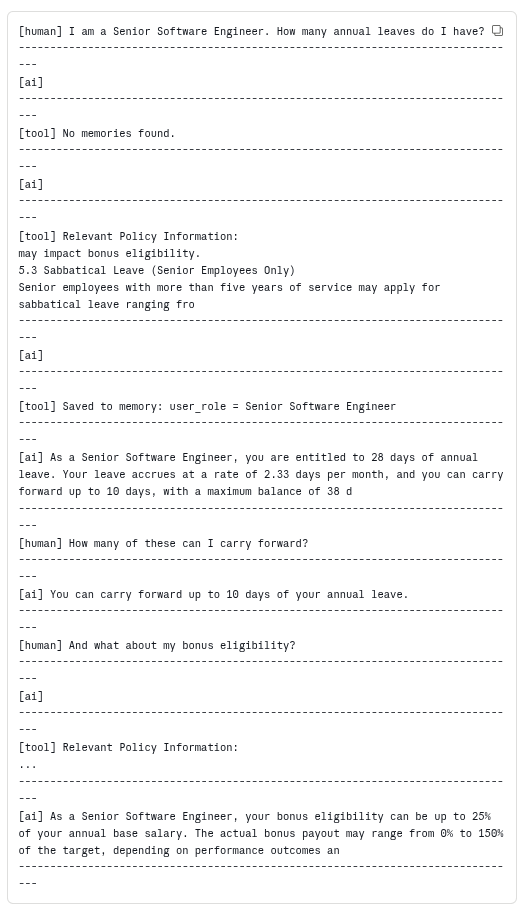
The trace reveals exactly what happened under the hood. On the first turn, the agent called `recall_memories` tool (which returned "No memories found"), then `search_company_policies` to find the leave policy, then `save_memory` to store the user's role. On the follow-up turns, the agent already had the context in the thread state and did not need to recall from memory again.
Step 8: Testing long-term memory
Long-term memory is what makes the system truly useful across separate sessions. In the test below, each query uses a different `thread_id`, simulating completely separate conversations. The agent saves facts to the `InMemoryStore` in one thread and retrieves them in a different thread.
response1 = query_agent("I am a Mid-level employee. Please remember this for future conversations.", thread_id="long-1")
print(response1)
Output:
Got it! I've noted that you are a Mid-level employee for future reference. How can I assist you today?The agent saved the user's seniority level to long-term memory. Inspecting the store at this point shows both the role saved earlier (from the short-term memory test) and the newly saved seniority level.
print_all_memories()Output:
Namespaces: [('memory',)]
  [memory] user_role: {'content': 'Senior Software Engineer'}
[memory] user_seniority: {'content': 'Mid-level'}Now, in a completely new thread with a different thread_id and no shared conversation history, the agent can still answer personalized questions.
response2 = query_agent("How many days of annual leave do I get?", thread_id="long-2")
print(response2)
Output:
You are entitled to 22 days of annual leave per year as a Mid-level employee.The agent started this thread by calling recall_memories, found the stored seniority level, and used it to provide a direct answer rather than listing all three tiers. This is the core value of agentic memory: the user shared their role once, and every future interaction benefits from it.
Step 9: Testing memory updates
When a user reports a change, the agent should update its stored knowledge rather than keeping stale data alongside the correction. In the test below, the user reports a promotion.
response4 = query_agent("I just got promoted to Senior level employee. Please update my records.", thread_id="update-1")
print(response4)
Output:
Congratulations on your promotion! I've updated your records to reflect your new seniority level as a Senior-level employee. If there's anything else you need, feel free to ask!The agent called `save_memory` with the existing user_seniority key, which overwrote the previous "Mid-level" entry with "Senior-level."
print_all_memories()
Output:
Namespaces: [('memory',)]
  [memory] user_role: {'content': 'Senior Software Engineer'}
  [memory] user_seniority: {'content': 'Senior-level'}
In a new thread, the agent now uses the corrected information.
response5 = query_agent("What is my current role and what bonus am I eligible for?", thread_id="update-2")
print(response5)
Output:
Your current role is a Senior Software Engineer. As a senior employee, you are eligible for a bonus of up to 25% of your annual base salary.Step 10: Testing memory deletion
The agent can also selectively forget information when asked.
response6 = query_agent("Please forget my current job role.", thread_id="delete-1")
print(response6)
Output:
I've forgotten your current job role. If there's anything else you need, feel free to let me know!The agent called `delete_memory` tool to remove the stored role. Inspecting the store confirms the deletion.
print_all_memories()
Output:
Namespaces: [('memory',)]
  [memory] user_seniority: {'content': 'Senior-level'}
The `user_role` key is gone. Only `user_seniority` remains. In a subsequent thread, the agent no longer has the role information.
response7 = query_agent("What do you remember about me?", thread_id="delete-2")
print(response7)
Output:
I remember that you are at a senior level in your role. Is there anything else you'd like me to remember or update?The agent only recalls the seniority level because the role entry was deleted. The deletion was targeted: it removed one specific key without affecting the rest of the stored memories.
Best practices for agentic memory implementation
Consider the following for cost-efficiency.
Scope memory by user and application
Use namespaces to isolate memories between users and prevent cross-contamination. In the implementation above, each user's memories are stored under a ("user_memory", user_id) namespace.
Manage context window budgets
Set token limits for memory injection and prioritize the most relevant memories. Deprioritize or prune stale or low-relevance memories to avoid wasting context space.
Decide between hot-path and background writes
Hot-path writes are immediately available but add latency to the response. Background writes are asynchronous but risk stale context in the next turn. Choose based on your latency requirements.
Implement memory hygiene
Periodically consolidate, deduplicate, and prune memories. Resolve contradictory facts by having newer facts override older ones.
Add observability to memory operations
Log every memory read, write, update, and delete. This is critical for debugging agents that behave unexpectedly due to stale or incorrect memories.
Test memory retrieval quality
Incorrect or irrelevant memory recall can be worse than no memory at all. Evaluate retrieval precision and recall as part of your testing pipeline.
Secure sensitive data
Memory stores may contain PII or proprietary information. Apply access controls, encryption, and retention policies.
Challenges in agentic memory management
While agentic memory enables agents to store, recall, and update knowledge across sessions, it also introduces a new class of failure modes that do not occur in stateless pipelines. The agent might forget to call the memory retrieval tool at the start of a conversation and try to re-fetch the information from the user that the user already provided. It might save duplicate or conflicting entries. It might retrieve stale memories and generate a response grounded in outdated facts. Or it might skip saving important details the user shared, permanently losing them.
This is where a robust evaluation and debugging platform like Patronus AI becomes essential.
How Patronus AI helps
Patronus AI is a platform-agnostic observability and evaluation platform built for modern LLM applications. It integrates with agent frameworks such as LangGraph, LangChain, and CrewAI to help developers trace agent workflows, identify failure points, and assess response quality.
One of the key components of Patronus AI is Percival, an AI debugger that observes and diagnoses the inner workings of an LLM application. Percival tracks not just inputs and outputs, but also every retrieval action, tool invocation, memory read, memory write, and internal decision made by the agent. This visibility level is critical when a memory-enabled agent spans multiple tool calls and dynamically adjusts its flow based on what it finds in the memory store.
Implementation example
Let's see how to integrate Patronus AI's tracing and debugging features into the LangGraph agentic memory application implemented in the previous section.
Run the following script to install Patronus and other required libraries.
# Remove ALL preinstalled OpenTelemetry packages
!pip uninstall -y opentelemetry-sdk opentelemetry-api \
    opentelemetry-semantic-conventions opentelemetry-exporter-otlp \
    opentelemetry-exporter-otlp-proto-grpc opentelemetry-proto \
    opentelemetry-instrumentation opentelemetry-instrumentation-logging \
    opentelemetry-instrumentation-threading opentelemetry-instrumentation-asyncio

# Install Patronus and LangChain instrumentation first
!pip install patronus openinference-instrumentation-langchain langchain-mistralai langgraph

# Pin *all* OTel core packages to the version known to work
!pip install --force-reinstall \
    opentelemetry-api==1.37.0 \
    opentelemetry-sdk==1.37.0 \
    opentelemetry-semantic-conventions==0.58b0 \
    opentelemetry-exporter-otlp-proto-grpc==1.37.0 \
    opentelemetry-exporter-otlp==1.37.0 \
    opentelemetry-proto==1.37.0

# Pin instrumentation packages to compatible versions
!pip install --force-reinstall \
    opentelemetry-instrumentation==0.56b0 \
    opentelemetry-instrumentation-logging==0.56b0 \
    opentelemetry-instrumentation-threading==0.56b0 \
    opentelemetry-instrumentation-asyncio==0.56b0
Next, in the same directory as your LangGraph application, add a file named "patronus.yaml" with the following credentials. Sign up with Patronus AI to get your API key.
project_name: "a-nice-project-name"
app: "a-nice-app-name"
api_key: "[Your key here]"
api_url: "https://api.patronus.ai"
otel_endpoint: "https://otel.patronus.ai:4317"
ui_url: "https://app.patronus.ai"
Import the following libraries and initialize Patronus.
from openinference.instrumentation.langchain import LangChainInstrumentor
from opentelemetry.instrumentation.threading import ThreadingInstrumentor
from opentelemetry.instrumentation.asyncio import AsyncioInstrumentor

import patronus

patronus.init(
    integrations=[
        LangChainInstrumentor(),
        ThreadingInstrumentor(),
        AsyncioInstrumentor(),
    ]
)
To enable Patronus tracing, add a decorator @patronus.traced("your-trace-id") to your function invoking the LangGraph agent, as the following script shows:
@patronus.traced("agentic-memory-test")
def query_agent(question: str, thread_id: str = "default"):
    """Query the memory-enabled agent.

    Args:
        question: The question to ask
        thread_id: Thread ID for short-term conversation history
    """
    config = {"configurable": {"thread_id": thread_id}}
    response = agent.invoke({"messages": [HumanMessage(content=question)]}, config)
    return response['messages'][-1].content
The process to invoke the agent remains the same. Let's run a query that exercises multiple memory operations. This query is run after the agent has already stored the user's role and seniority level from previous interactions, so the agent should recall from memory rather than asking the user to repeat themselves.
print("Q3: Am I eligible for a bonus?")
response3 = query_agent("Am I eligible for a bonus?", thread_id="long-3")
print("A3 (long-term memory):", response3)
Output:
Q3: Am I eligible for a bonus?
A3 (long-term memory): As a Senior Software Engineer at a mid-level position, you are eligible for a bonus of up to 25% of your annual base salary. The actual bonus payout can range from 0% to 150% of the target, depending on performance outcomes and company results. If you have been employed for only part of the year, the bonus will be prorated accordingly.
Now, if you go to your Patronus Dashboard and click "Traces" from the left sidebar, you will see a list of all your traces. You can click a trace name to see the complete trace details. For example, the "agentic-memory-test" trace for the query above looks like this.
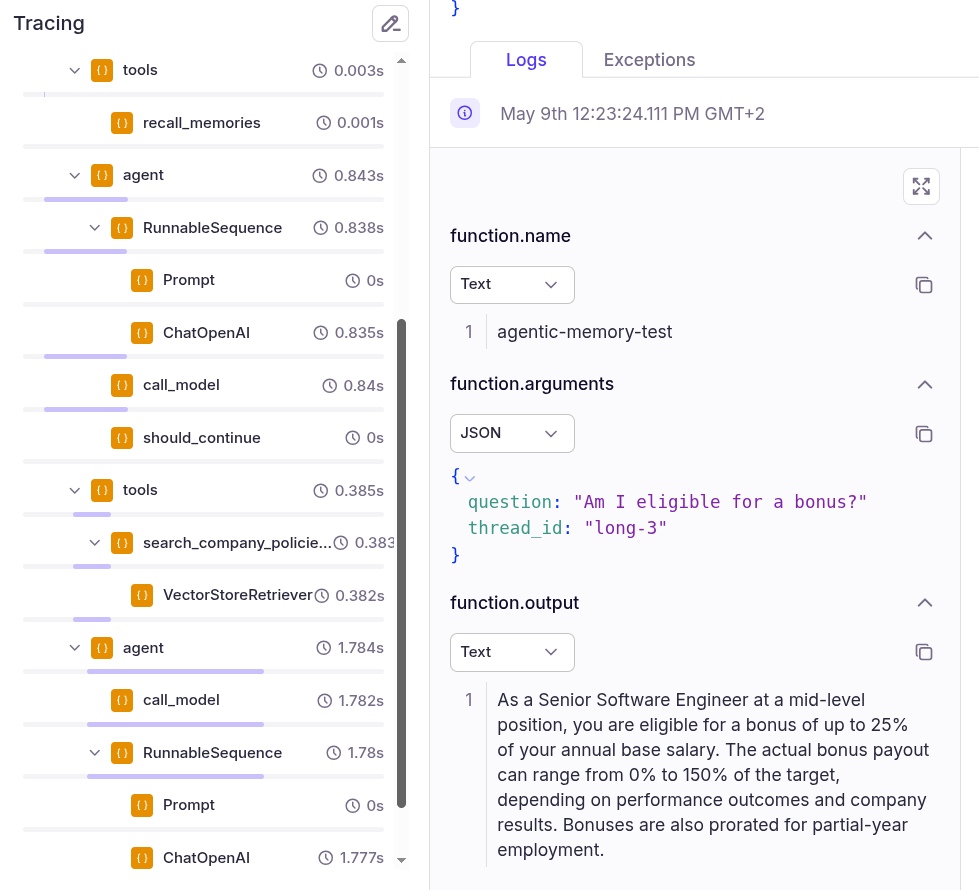
The trace shows that the agent followed the expected orchestration pattern: it checked memory first, found the stored role and seniority, used that context to search the bonus policy, and generated a response grounded in both the memory and the retrieved policy text.
Finally, click the "Analyze with Percival" button in the top-right corner to get Percival's complete trace analysis, along with remedies to address any potential problems.
{{banner-dark-small-1="/banners"}}
Final thoughts
Agentic memory extends the capabilities of AI agents by introducing persistent, structured, and agent-controlled storage. Combining short-term session context with long-term semantic, episodic, and procedural memory allows agents to maintain continuity, personalize interactions, and learn from past experiences.
The implementation does not require a complete reorganization of your agent architecture. As shown in this article, you can start with short-term memory and incrementally add long-term memory types as your use case demands. The key is choosing the right memory types for your application and managing them with proper scoping, hygiene, and observability.
Patronus AI complements this development model by offering end-to-end observability and evaluation. Its tracing and debugging features make it easier to inspect agent behavior, detect silent failures caused by stale or incorrect memory, and refine application pipelines without overhauling your application stack.
Explore Patronus AI to build, test, and debug reliable memory-enabled agentic systems at scale.